BME280 से तापमान, आर्द्रता, और दबाव प्राप्त करके ESP32 के Wifi कनेक्शन के माध्यम से सीधे graphite में भेजने का एक रिकॉर्ड किया गया है।
graphite और Grafana की व्याख्या नहीं की जाएगी।
उपयोग की गई वस्तुएँ
| उत्पाद नाम | खरीदने की जगह |
|---|---|
| ESP-32S | AliExpress Amazon 楽天 |
| BME280 | AliExpress Amazon 楽天 |
कनेक्शन आरेख
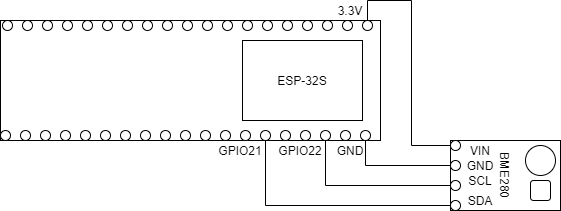
BME280 और ESP-32S को I2C के माध्यम से जोड़ा गया है।
ESP-32S में GPIO21 SDA और GPIO22 SCL के रूप में दिखाई देता है।
| ESP-32S | BME280 |
|---|---|
| 3.3V | VIN |
| GND | GND |
| GPIO21 | SDA |
| GPIO22 | SCL |
सामग्री
- Wifi से कनेक्ट करें
- NTP सर्वर से समय प्राप्त करें
- समय अंतराल में 1 सेकंड के लिए डेटा भेजने के लिए टिकल बनाएं
कोड
#include <Arduino.h>
#include <WiFi.h>
#include <Wire.h>
#include <Adafruit_BME280.h>
#include <Ticker.h>
#include <WiFiUdp.h>
#include <time.h>

// Wifi
const char SSID[] = "";
const char PASSWORD[] = "";

// NTP सर्वर
const char NTP_SERVER[] = "ntp.nict.jp";

// Graphite
IPAddress graphite(192,168,0,10);

// ट्रिकर
Ticker ticker;
bool flagTicker = false;

// BME280 सेंसर
Adafruit_BME280 bme;

void setTicker() {
    flagTicker = true;
}

// UDP
WiFiUDP udp;

void setup() {
  Serial.begin(115200);
  while (!Serial);

  if (!bme.begin(0x76)) {
    Serial.println("BME280 सेंसर में त्रुटि!");
    while (1);
  }

  // Wifi कनेक्शन
  WiFi.begin(SSID, PASSWORD);
  Serial.print("WiFi कनेक्ट हो रहा है");
  while (WiFi.status() != WL_CONNECTED) {
    Serial.print(".");
    delay(100);
  }

  IPAddress ipaddr, gateway;
  ipaddr = WiFi.localIP();
  gateway = WiFi.gatewayIP();
  Serial.println("Wifi कनेक्टेड।");
  Serial.print("IPAddr:");
  Serial.println(ipaddr);
  Serial.print("Gateway:");
  Serial.println(gateway);

  // NTP
  configTime(9 * 3600L, 0, NTP_SERVER);

  // मिलीसेकंड
  struct timeval tv;
  int ms = 0;
  while(1) {
     if (gettimeofday(&tv, NULL) != 0) {
       Serial.println("gettimeofday में त्रुटि।");
     }else{
      ms = tv.tv_usec / 1000LL;
    }
    if(ms == 0) {
        ticker.attach_ms(1000, setTicker);
        Serial.println("टिकर सेट किया गया");
        break;
    }
  }
}

void send() {
    time_t now;
    time(&now);
    udp.beginPacket(graphite, 2003);
    udp.println("sec.esp32.temperature " + String(bme.readTemperature()) + " " + now);
    udp.println("sec.esp32.humidity " + String(bme.readHumidity()) + " " + now);
    udp.println("sec.esp32.pressure " + String(bme.readPressure() / 100) + " " + now);
    udp.endPacket();
}

void loop() {
  if(flagTicker) {
      send();
      flagTicker = false;
  }
}
उपयोग की गई लाइब्रेरी
Grafana में ग्राफ बनाना
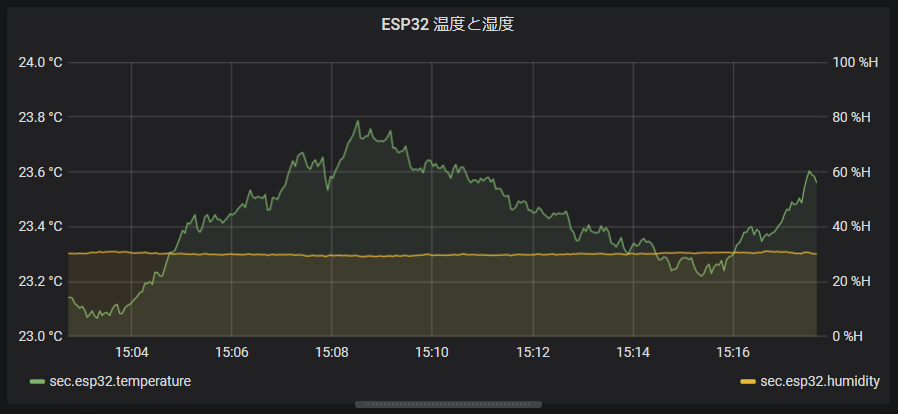
BME280 के सेंसर डेटा को ESP32 के माध्यम से प्राप्त किया गया और Wifi के माध्यम से Graphite (go-carbon) में संग्रहीत किया गया और Grafana में
ग्राफ के रूप में प्रस्तुत किया गया।
हर सेकंड डेटा जोड़ा जा रहा है जिससे काफी रियल-टाइम डेटा प्राप्त किया जा रहा है।
ऊर्जा खपत भी 0.5W से कम हो गई है, जिससे घर में डेटा संग्रहण सुविधाजनक हो जाएगा।